Hey there, fellow drone enthusiasts! I'm a supplier of some pretty awesome camera drones, and I know how frustrating it can be when your drone just won't take off. But don't worry, I've got your back. In this blog, I'll walk you through some common reasons why a camera drone might not take off and how to troubleshoot them.
1. Check the Power Source
First things first, the power source is crucial. A dead or low - charged battery is one of the most common reasons a drone won't take off. Make sure your drone's battery is fully charged. Most of the drones we supply, like the Drone with 1080p HD Camera and GPS, come with a battery indicator. Check it to see if the battery has enough juice.
If the battery is charged but still won't power the drone, there might be an issue with the battery connection. Sometimes, the battery might not be seated properly in the drone. Remove the battery and then re - insert it carefully, making sure it clicks into place. Also, check for any signs of damage on the battery, such as swelling or leaks. If you notice any of these, it's time to get a new battery.
2. Look at the Propellers
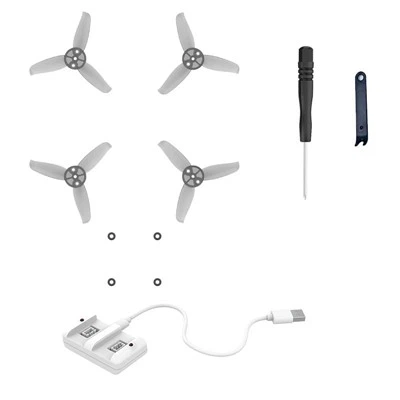
Propellers are like the wings of your drone. If they're damaged or not installed correctly, your drone won't take off. Inspect each propeller for cracks, chips, or bent blades. A damaged propeller can cause an imbalance, which will prevent the drone from lifting off.
If you find a damaged propeller, replace it immediately. We offer replacement propellers for all our drones, including the Foldable Drone with 4k Camera. When installing new propellers, make sure you put them on the right motors. Usually, there are markings on the propellers and the drone to indicate the correct placement.
3. Calibration Issues
Calibration is super important for a drone to fly properly. If your drone's compass or accelerometer isn't calibrated, it might not take off or will behave erratically. Most drones have a calibration function in their app.
To calibrate the compass, find an open area away from metal objects and electronic devices. Open the drone's app and follow the on - screen instructions. Usually, you'll need to place the drone flat on a surface and rotate it in different directions. For the accelerometer calibration, place the drone on a level surface and let the app do its thing.
4. Check the Flight Mode
Some drones have different flight modes, and if you've accidentally set it to a mode that restricts takeoff, your drone won't lift off. For example, some drones have a "training mode" that limits the altitude and speed, and in some cases, it might prevent takeoff until certain conditions are met.
Check the drone's app or the controller to make sure you're in the correct flight mode. If you're new to flying, the "beginner mode" might be a good start, but make sure it allows for takeoff.
5. Interference and Signal Issues
Interference from other electronic devices or a weak signal between the drone and the controller can also cause takeoff problems. Make sure you're in an area with minimal interference. Avoid flying near power lines, Wi - Fi routers, or other drones.
Check the connection between the controller and the drone. Make sure the controller is turned on and paired with the drone correctly. If you're using a smartphone or tablet with the drone's app, check the Wi - Fi or Bluetooth connection. Sometimes, restarting the controller and the drone can help re - establish the signal.
6. Obstacle Sensors
Many modern drones come with obstacle sensors to prevent collisions. If these sensors detect an obstacle in the way, the drone might not take off. Check the area around the drone to make sure there are no objects blocking the sensors.
If the sensors seem to be malfunctioning, you can try resetting them in the drone's app. Some drones also allow you to disable the obstacle sensors temporarily, but use this option with caution.
7. Firmware Updates
Outdated firmware can cause all sorts of problems with your drone, including takeoff issues. Check the drone's app or the manufacturer's website for any available firmware updates.


Updating the firmware is usually a straightforward process. Download the update file and follow the instructions in the app to install it. Make sure your drone's battery is fully charged before starting the update, as an interrupted update can cause more problems.
8. Controller Problems
The controller is your link to the drone, and if it's not working properly, the drone won't take off. Check the batteries in the controller. If they're low, replace them with fresh ones.
Also, look for any physical damage to the controller, such as broken buttons or a cracked case. If you notice any issues, contact our customer support, and we can help you get a replacement or repair the controller.
Conclusion
So, there you have it! These are some of the most common reasons why a camera drone might not take off and how to troubleshoot them. I hope this guide helps you get your drone up in the air again.
If you've tried all these steps and your drone still won't take off, don't hesitate to reach out to us. We're a camera drone supplier, and we're here to support you. Whether you need replacement parts, technical advice, or are interested in purchasing a new drone, we're just a message away.
If you're in the market for a new camera drone, we've got a great selection. Our Drone with 1080p HD Camera and GPS is perfect for beginners, while the Foldable Drone with 4k Camera is great for more advanced users who want high - quality footage.
Contact us if you're interested in purchasing our drones or need any assistance with your existing ones. We're always happy to help you with your drone needs.
References
- Drone User Manuals
- Manufacturer's Technical Support Guides
- Online Drone Communities and Forums